Set up FairPro for your organisation
For administrators: work through the setup checklist, from your companies and people to templates and imports, alone or with the assistant.
Where to start
A new organisation goes through a short list of steps before its people use FairPro. Open Settings in the sidebar, then Setup checklist. Or choose Continue setup on the home page.
The checklist is for people who may change the organisation’s settings, such as the Tenant administrator. Until every essential step is done, their home page shows how far setup has gone.
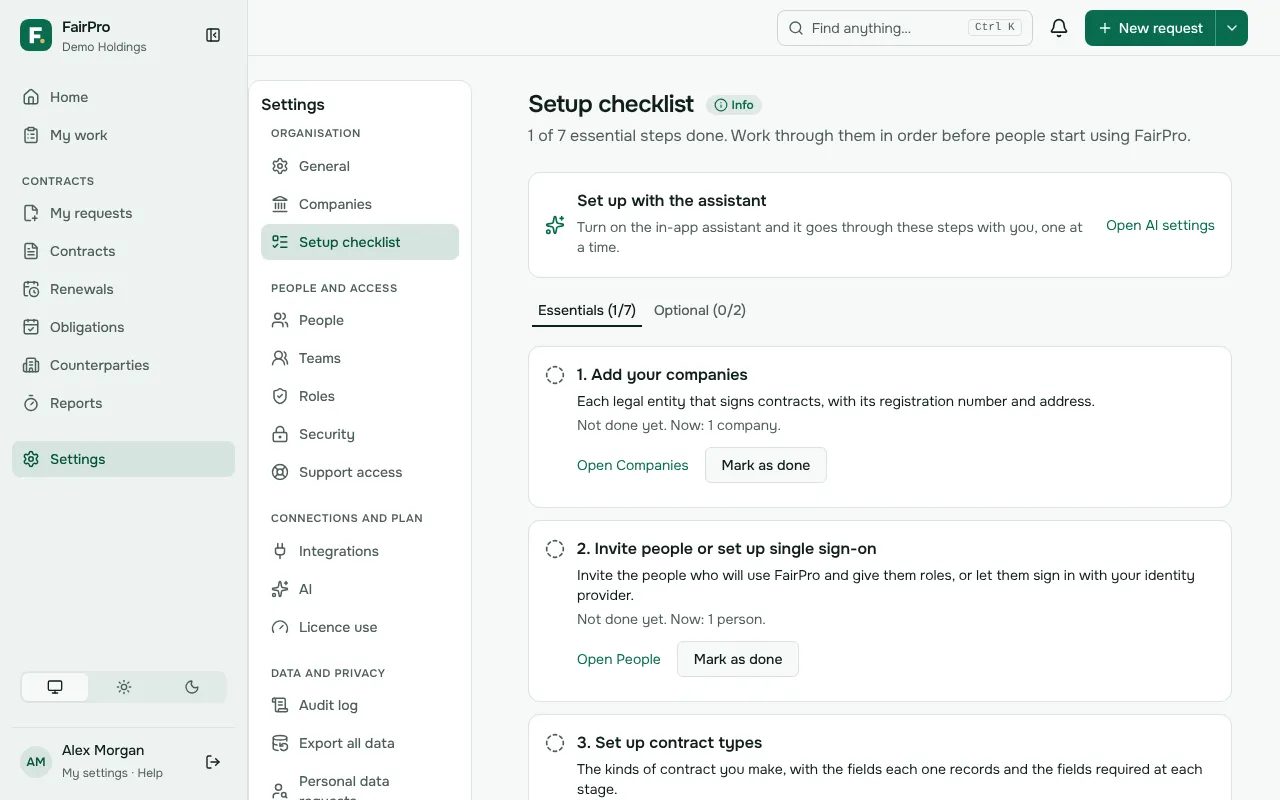
The essential steps
Work through them in order. Each step opens the page where it is done.
- Add your companies: each legal entity that signs contracts, with its registration number and address.
- Invite people or set up single sign-on: invite the people who will use FairPro and give them roles, or let them sign in with your identity provider.
- Set up contract types: the kinds of contract you make, with the fields each one records.
- Check the approval workflow: who approves which contracts, and the value thresholds that bring in finance or the board.
- Add your templates: upload your Word templates, or start from FairPro’s library for your country.
- Import your counterparties: bring in your suppliers and customers from Excel or CSV.
- Import your existing contracts: bring in signed contracts as files, or your contract register from Excel, so renewals and reports start complete.
Optional steps
The Optional tab holds steps you may not need yet, such as Choose how FairPro uses AI, Send emails from your own domain and Connect DocuSign. A step for an add-on shows only once FairPro has switched the add-on on for your organisation.
Marking steps done
Your organisation starts with a company, a contract type and default approvals, so FairPro cannot tell when you have checked them. Choose Mark as done on each step when you have.
Some steps show as done on their own: inviting people once someone else has joined, and the imports once counterparties or imported contracts are in. A step marked by mistake can be changed back with Mark as not done. Each change is in the audit log.
Setting up with the assistant
If the in-app assistant is on, choose Set up with the assistant. It reads the checklist and takes you through the next step, one at a time.
The assistant can prepare a company, invitations, a contract type or approval amounts for you. Nothing changes until you confirm each one in FairPro. Keys, passwords, DNS records and files are never typed into the chat: the assistant links you to the page where they go.